To change or reset your trading account password, please follow these steps:
1. Log in to your LBX account.
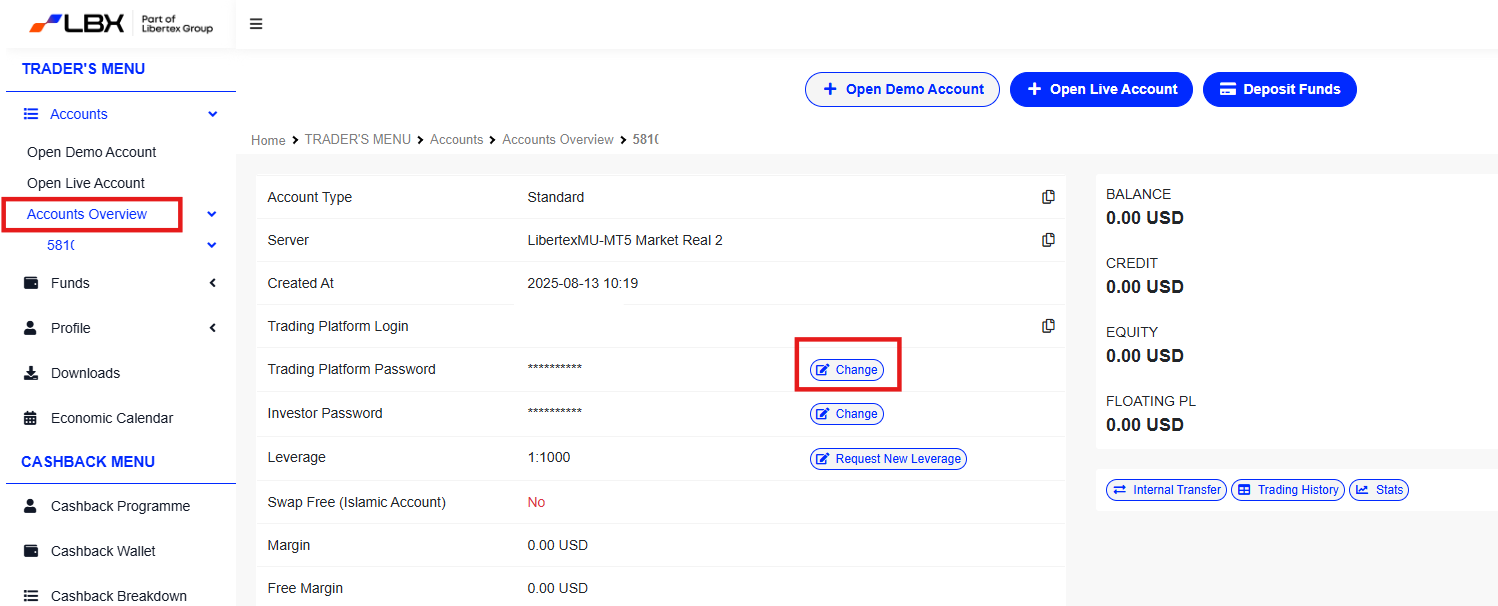
2. In your Trader’s menu, find and click on the "Accounts" section, then select "Accounts Overview".
3. In the accounts list, find the account number for which you would like to change the password and click the "Change" option.
4. Check your email for PIN code: The system will send an email containing a PIN code to your registered email address. Please check your Inbox and Spam folders.
5. Enter the new password in the corresponding field and confirm it.
6. Enter PIN code: Enter the PIN code sent to your email address into the corresponding field.
7. After entering the correct PIN code, click "Continue" to complete the password change or reset process.
8. Check the confirmation email: Once the process is completed, you will receive a confirmation email notifying you that your password has been successfully changed.
If you face any difficulties during the process, please submit a ticket for further support.
Was this article helpful?
That’s Great!
Thank you for your feedback
Sorry! We couldn't be helpful
Thank you for your feedback
Feedback sent
We appreciate your effort and will try to fix the article