1. How can I register as an IB Partner?
To join our IB Partner Program, simply follow this link.
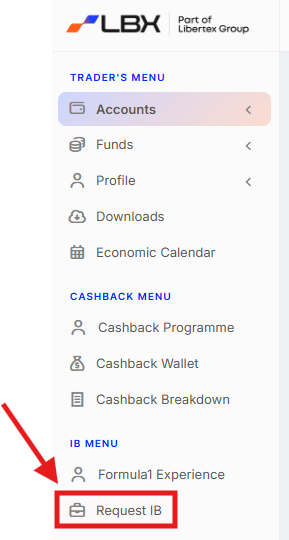
After verifying your account, click "Request IB" in your account profile.
2. How can I log into my Partner account profile?
To log in to your personal IB partner account, simply click this link and enter your credentials.
3. How can I get support if I have questions or need help?
We are committed to your success and are happy to assist you in any way we can
Existing IB Partners: If you already have an active IB Partner account, your dedicated IB manager is here to help. Don't hesitate to reach out to them directly. You can find their contact information in the top right corner of your account profile.

E-mail our support team: Send an e-mail to ib@lbx.com, and we will swiftly revert with the answers.
4. Are there any fees for joining the IB Program?
There's no cost to become an IB Partner. Simply complete our quick and easy registration form to get started.
5. Where can I find my Partnership agreement?
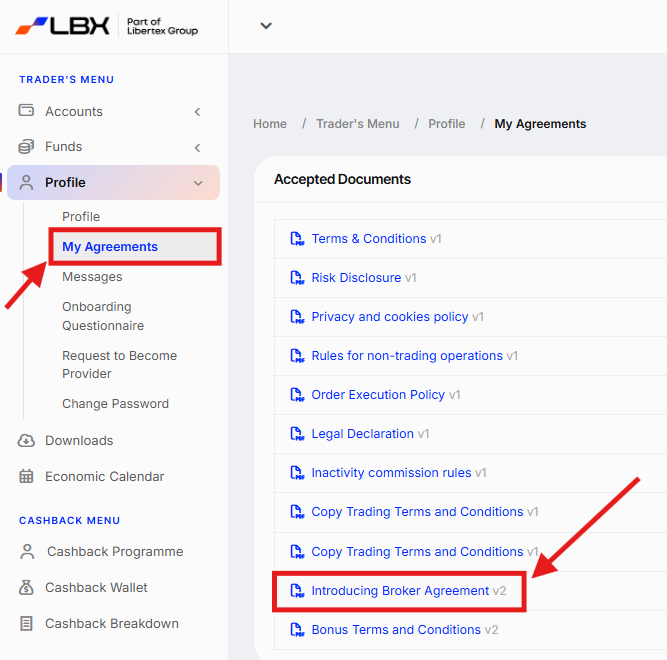
You can find the Agreement in your account profile:
Navigate to the "Trader's Menu" → "Profile"→ "My agreements" tab on the left side of your account. This is where you will find all the necessary documents, including the IB Terms and Conditions ("Introducing Broker Agreement").
6. How can I get my IB Partner account verified, and why do I have to do this?
In order to ensure compliance with regulations and secure your partner commission payouts, all IB Partners must complete a verification process. Without successful verification, an IB Partner won't be eligible to receive partner commissions.
We've made this process as smooth as possible. To get started, simply follow the detailed instructions provided on this link.
Was this article helpful?
That’s Great!
Thank you for your feedback
Sorry! We couldn't be helpful
Thank you for your feedback
Feedback sent
We appreciate your effort and will try to fix the article