1. How does my unique IB partner link work?
Here's how to easily introduce clients using your unique IB link:
Choose the Link: Find your configured links in the "Marketing Tools" section of your account. Configure a new one or simply copy one of the existing links.
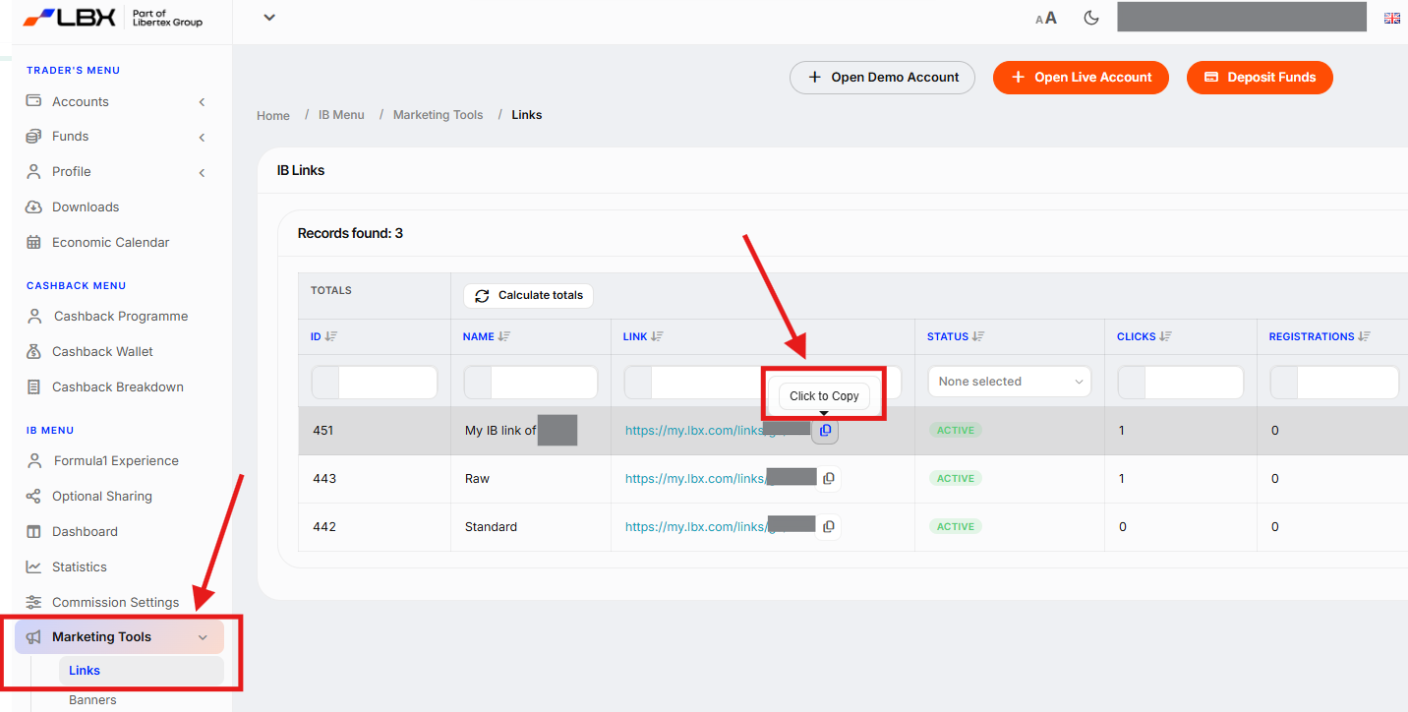
Share the Link: Send the link directly to your client or share it on your preferred platforms (social media, forums, etc.).
Track Your Referrals: When your client clicks the link, they'll be taken to a registration page. Once they register using your link, you'll see their information in your Partner area.
2. Where can I find marketing materials?
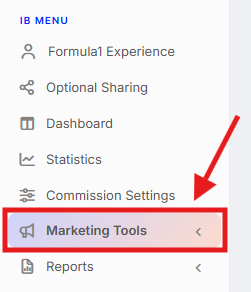
Marketing materials are readily available within your personal Partner Area. Simply click on "IB Menu" → "Marketing Tools" tab located on the left-hand navigation panel.
3. How can I check if a client is registered under my IB partner account?
See your clients and find them easily: Go to the "IB Menu" → "Dashboard" tab on the left side of your account. That is where you will see all the clients registered under your IB partner account.
Filters: Refine the list by time period if needed
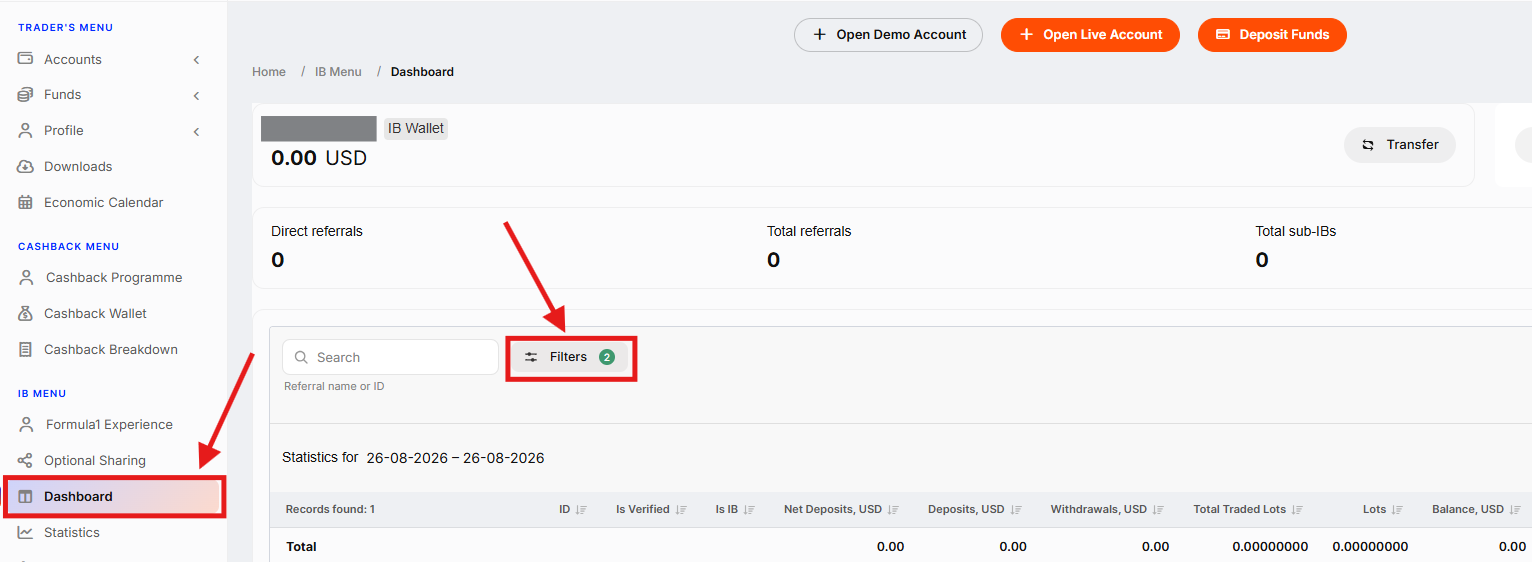
Need a specific client? Use the search bar with their name, ID, or account number to find them quickly. Matching clients will appear below.
This way, you can gain access to a wide range of metrics for each referred client, including deposits, withdrawals, equity, lots traded, and more.
4. What can I do if I don't see clients registered using my unique IB links in my account profile?
If you're confident clients registered through your links, but they're missing from your "IB Menu" → "Dashboard" tab, here's how we can help:
Contact your IB manager: This is the quickest option for personalised assistance. You can find their contact information in the top right corner of your account profile.
E-mail our support team: Send an e-mail to ib@lbx.com with details about the missing clients.
For faster resolution, please include:
The missing client's details
A screenshot (if possible) or any other proof that connects you to the client
This information will help us investigate the issue efficiently and get your client list back on track.
5. How can I introduce a Sub-IB partner?
To register a Sub-IB, simply share your unique referral link with them. Here's how to access your links:
Choose the Link: Find your configured links in the "IB Menu" → "Marketing Tools" section of your account. Configure a new one or simply copy one of the existing links.
Share the Link: Send the link directly to your Sub-IB or share it on your preferred platforms (social media, forums, etc.).
Once registered and verified, they can click "Request IB" in the account profile.
6. Where can I find information about my Sub-IBs and clients they referred?
In your Partner account profile, you can track your Sub-IB network with ease:
Go to the "IB Menu" → "Dashboard" tab on the left side of your account. That's where you will see all the clients registered under your IB partner account, including Sub-IBs and their referred clients.
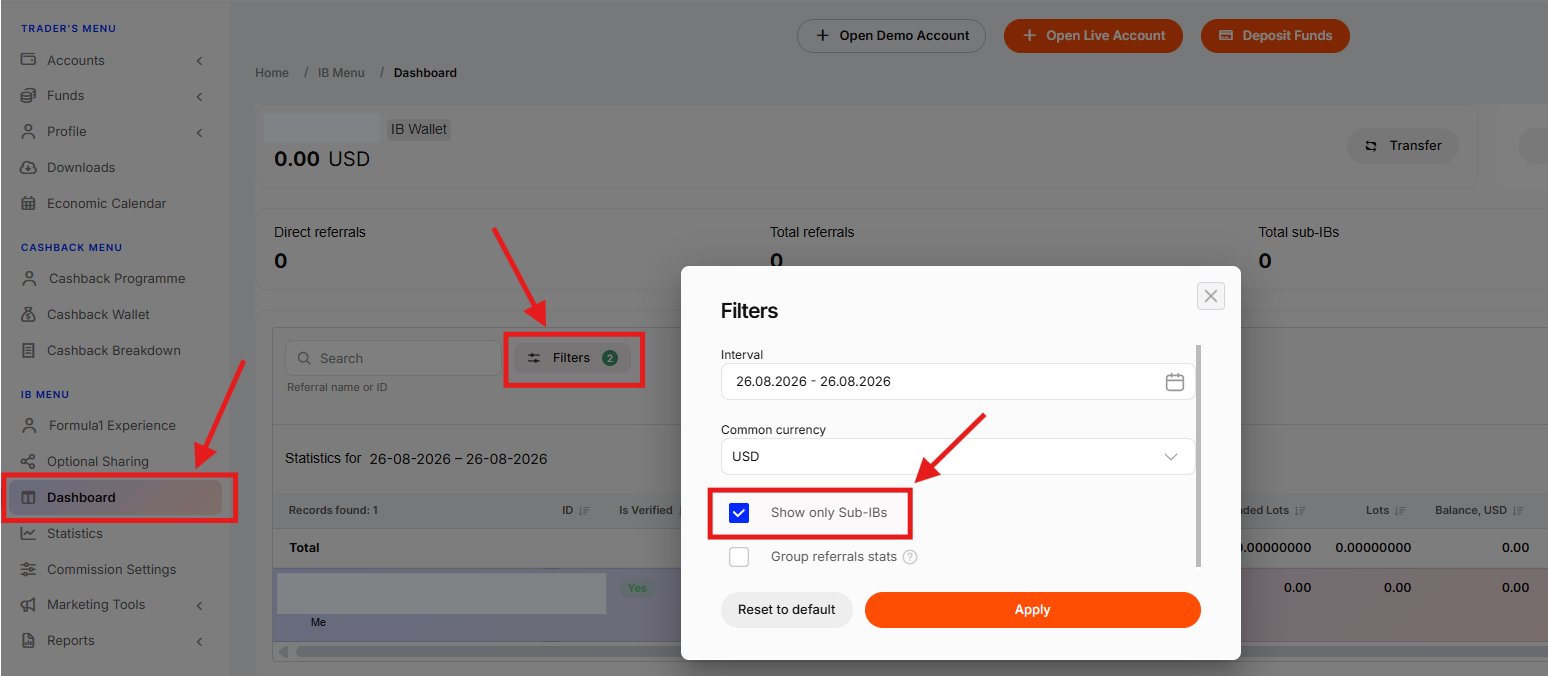
Filters: Refine the list by time period using the filters. Use "Show Only Sub-IBs" to see only the data related to your Sub IBs. Use the "+" button to unfold the detailed view for each Sub-IB's list of their referred clients.
Need a specific Sub-IB? Use the search bar with their name, ID, or account number to find them quickly. Matching records will appear below.
This way, you can gain access to a wide range of metrics for each Sub-IB and their referred clients, including deposits, withdrawals, equity, lots traded, and more.
7. What can I do if I don't see my Sub-IB partner in my account profile?
If you're confident that an IB Partner registered through your link, but they're missing from your "IB Menu" → "Dashboard" tab, here's how we can help:
Contact your IB manager: This is the quickest option for personalized assistance. You can find their contact information in the top right corner of your account profile.
E-mail our support team: Send an e-mail to ib@lbx.com with details about the missing Sub-IB(s).
For faster resolution, please include:
Specific details about the issue
A screenshot (if possible) or any other proof that connects you to the Sub-IB.
This information will help us investigate the issue efficiently and get your Sub-IB list back on track.
8. From what countries can I refer clients as an IB?
IB partners can refer traders from any of the countries that LBX currently operates in. The full list can be found in the following article.
Was this article helpful?
That’s Great!
Thank you for your feedback
Sorry! We couldn't be helpful
Thank you for your feedback
Feedback sent
We appreciate your effort and will try to fix the article