1. When and how are my IB commissions paid?
Withdraw your partner commissions daily!
Earn and Track: Once your referred clients' trades are closed, view your earned commissions in your "IB Menu" → "Dashboard" tab.
Request Withdrawal: Click "Transfer to Wallet" to initiate a withdrawal.
Choose Destination: Select either your Wallet or a specific trading account.
Specify Amount: Choose the desired amount from your available balance.
Confirm Request: Submit your withdrawal request.
Processing Time: Withdrawal requests are typically processed within 1 business day, but may take longer in some cases.
Maximum Requests: 1 per day
2. How can I get information about IB Commission plans?
Existing IB Partners:
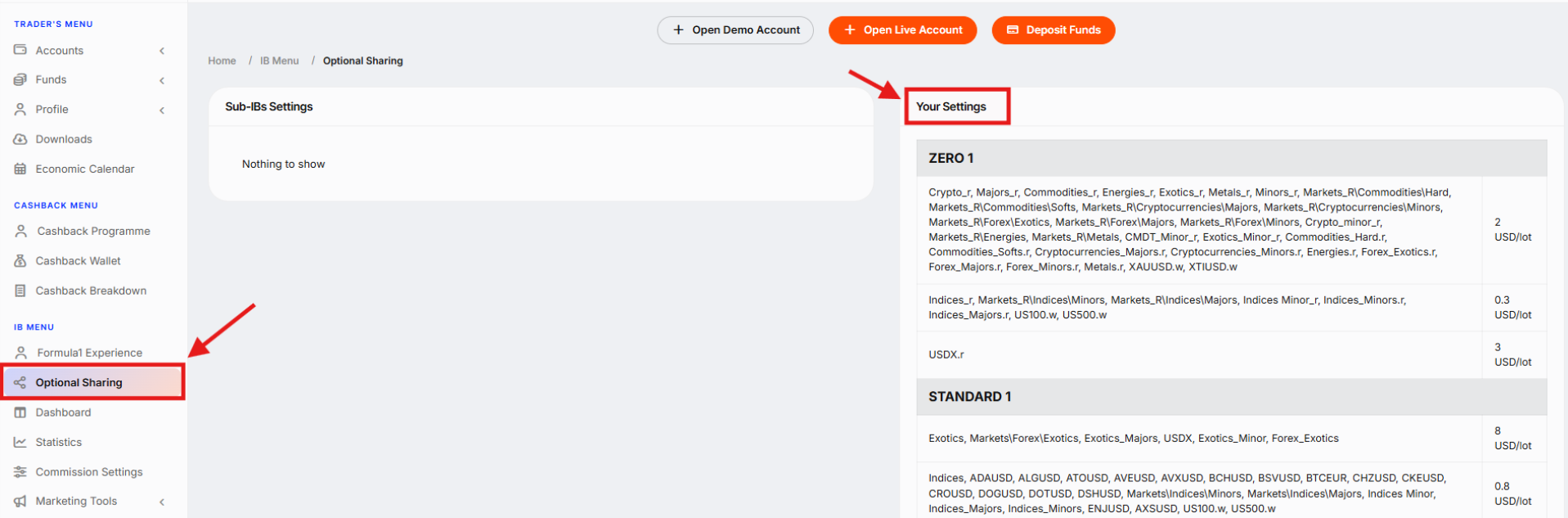
To view your IB partner commissions, go to the "Optional Sharing" tab on the left side of your account. This section provides a detailed breakdown of your commissions, categorized by specific instruments and instrument groups.
Need further clarification?
Your dedicated IB manager is your best resource for in-depth information about your specific partner commission plan. They can answer any questions you may have and provide personalised guidance. You can find their contact information in the top right corner of your account profile.
New to the Program:
If you haven't activated your IB Partner account yet, but have general inquiries about commission plans, feel free to contact us at ib@lbx.com
3. How can I set up the IB commissions sharing with my Sub-IBs?
You can easily manage commission sharing with your Sub-IBs through your account profile. Just go to the "IB Menu" → "Optional Sharing" → "Sub-IBs Settings" tab. That's where you can define commission amounts for each Sub-IB on an instrument-by-instrument basis or by grouping instruments.
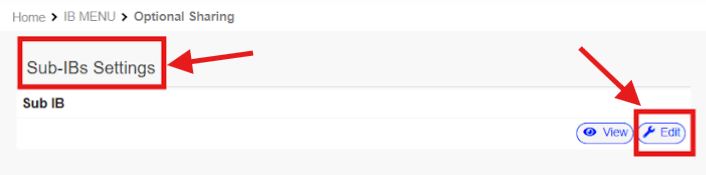
You have the freedom to change these settings at any time.
4. Can I receive IB commissions for my own trading?
No, receiving IB commissions for self-trading is prohibited at LBX.
Was this article helpful?
That’s Great!
Thank you for your feedback
Sorry! We couldn't be helpful
Thank you for your feedback
Feedback sent
We appreciate your effort and will try to fix the article